Resume-as-Code: Building Your Developer CV with JSON
Ask any developer about the most frustrating part of job hunting and they'll likely mention wrestling with resume templates. Word and PDF files force you into rigid layouts, and tweaking a single bullet point can break the entire design. Worse, these files don't always play nicely with automated hiring systems. Modern applicant tracking systems (ATS) are everywhere - according to a 2023 study, nearly 98% of Fortune 500 companies and approximately 75% of employers overall use ATS systems to filter candidates. Yet complex designs and fancy formatting can confuse ATS parsers, causing important information to get lost. When a significant majority of employers report they may be missing qualified candidates because resumes aren't ATS-friendly, it's clear that our approach to resumes needs to change. Enter the resume-as-code movement.
Why JSON for Resumes?
JSON (JavaScript Object Notation) has become the lingua franca of modern development. It's human-readable, machine-parseable, and universally supported across programming languages and platforms. When you structure your resume as JSON, you're creating a data file that separates content from presentation - exactly how developers think about building applications.
Instead of embedding data and design in a single document like Word or PDF, JSON resumes store your professional information as structured data. This makes your resume inherently machine‑readable and ATS‑friendly. Because it's just JSON, you can transform it into HTML or PDF, validate it programmatically, and integrate it into any workflow you like. The format is flexible enough to represent any professional experience while remaining simple enough for both humans and machines to understand. To explore how structured data and AI are transforming resume creation, read about the future of tech resumes.
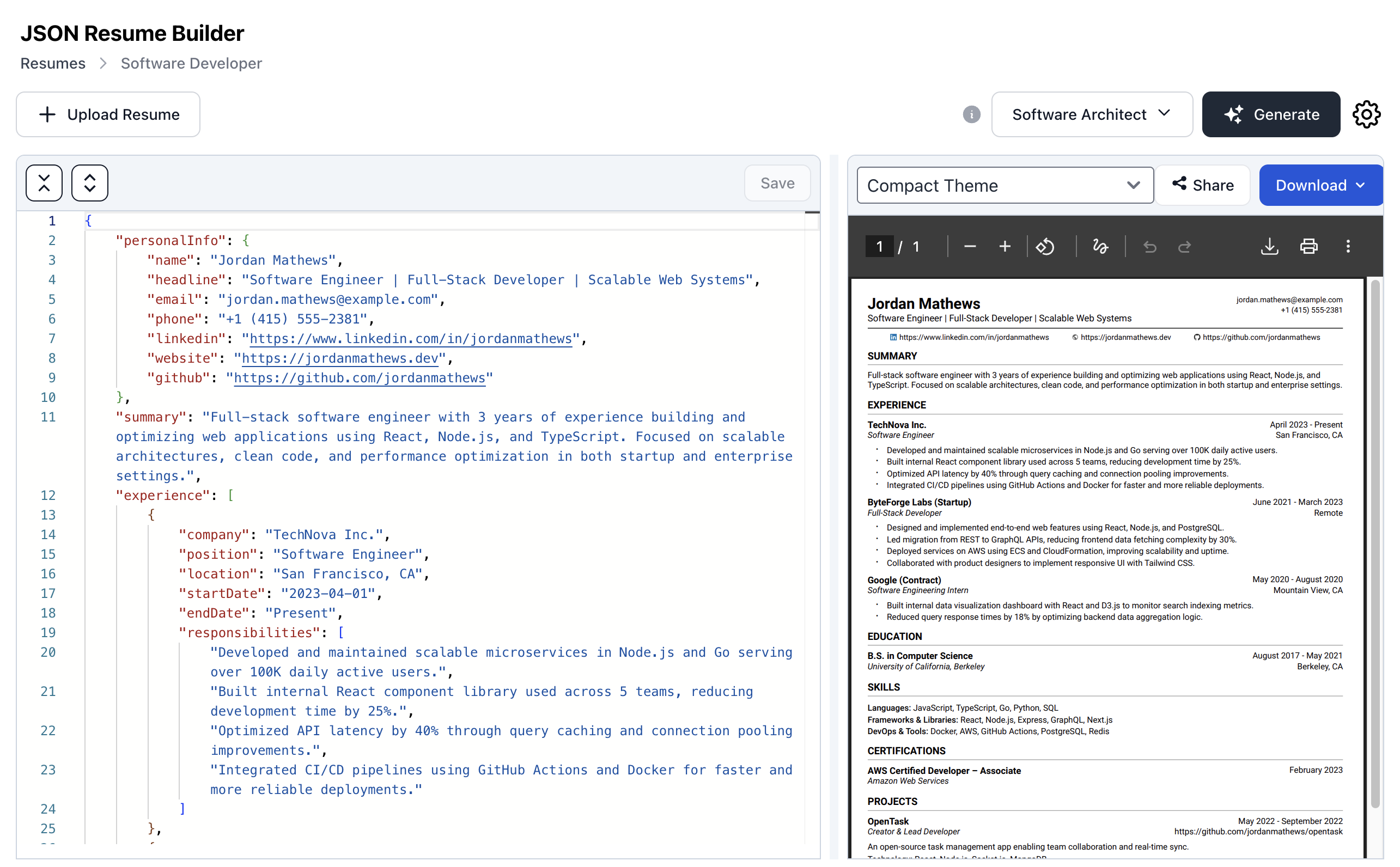
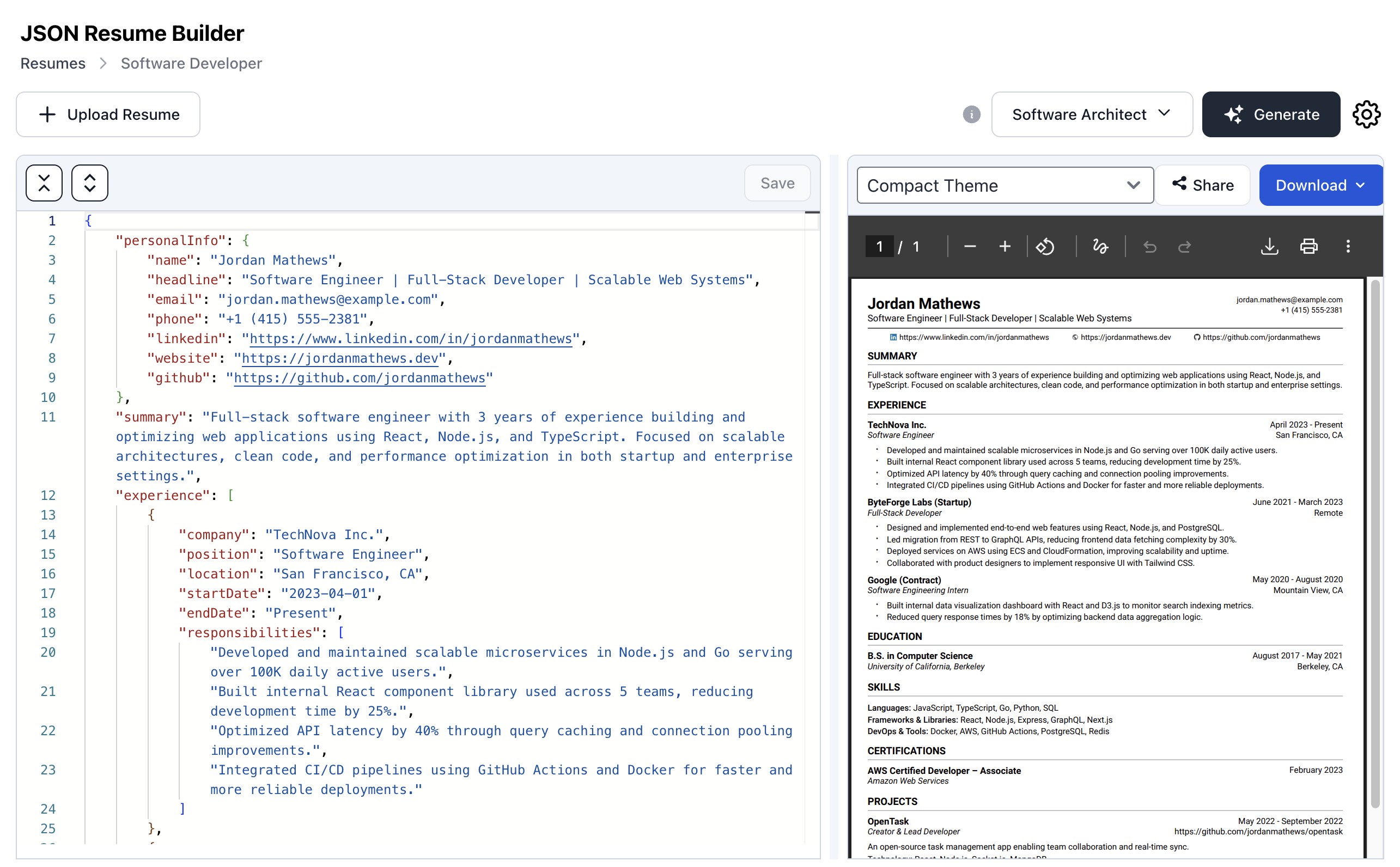 Editing your resume in JSON format with syntax highlighting and real-time validation
Advantages of Treating Your Resume Like Code
Separation of data and presentation – JSON resumes decouple content from design. Your professional data lives in the JSON file, while themes and templates handle the visual presentation. This separation allows you to switch from a minimalist layout to a creative template without touching the underlying data. You can preview how your resume looks in multiple styles and pick the one that best suits the target role or company. When you need to update your experience, you edit the JSON once, and all your resume variants update automatically.
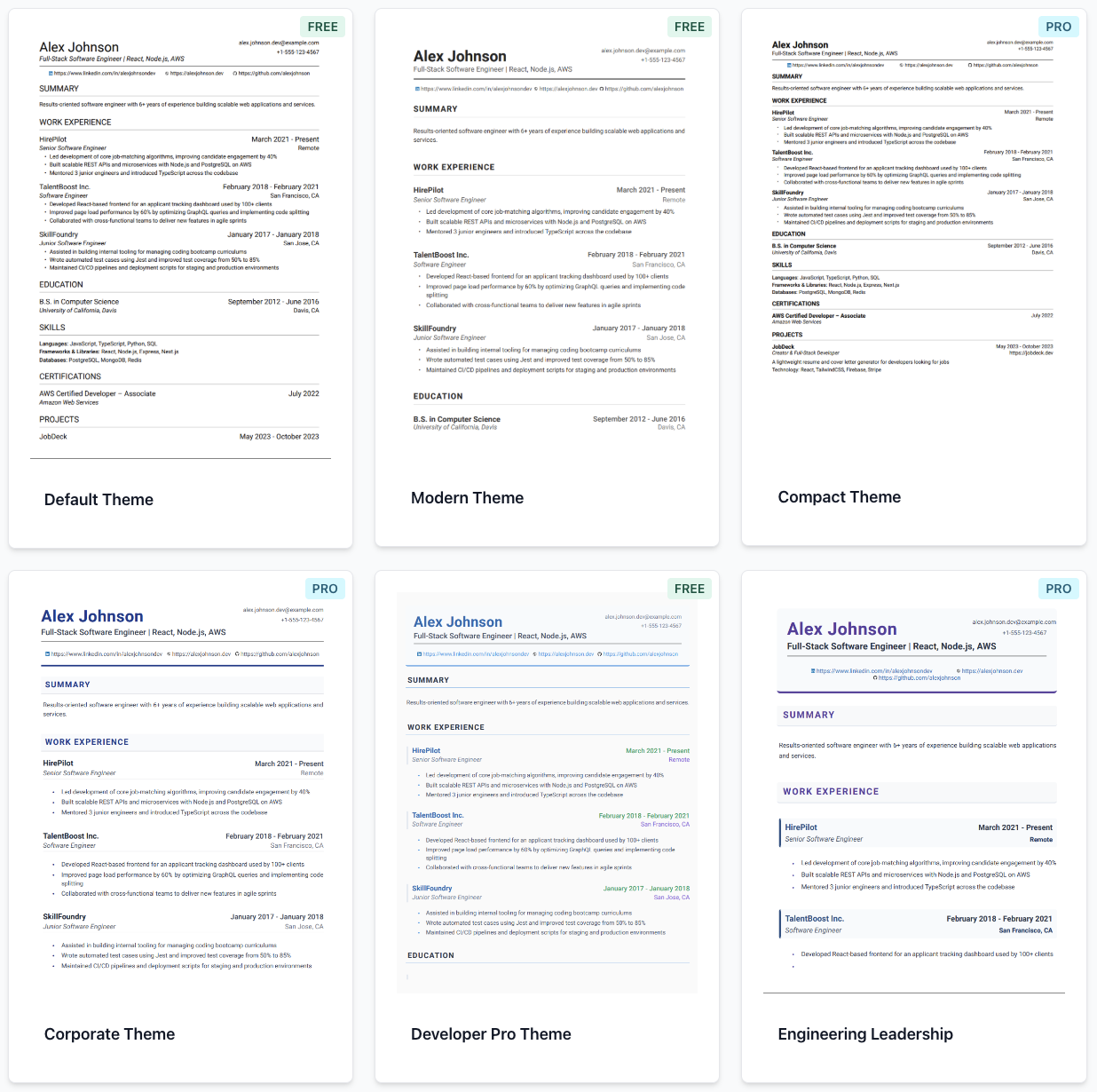 One JSON source generating multiple professional resume templates with different visual styles
Reusability and modularity – A single JSON file can generate multiple resume variants. For example, you might emphasize management experience for one application and technical skills for another. Because the data is structured, you can programmatically include or exclude sections, reorder content, and export to different formats without copying and pasting. This modularity saves time and reduces errors when tailoring your resume for different opportunities.
Automation and integration – JSON resumes fit naturally into developer workflows. Modern JSON resume editors provide real‑time editing with syntax highlighting, validation, and instant previews. Some even offer AI-powered suggestions to help you improve your content before exporting. You can also integrate resume generation into automation pipelines if needed, validating the data and exporting to multiple formats programmatically.
Portability and future-proofing – Unlike proprietary formats, JSON is an open standard that will be readable for decades. Your resume data isn't locked into a specific tool or platform. You can export it, import it elsewhere, or build custom tools around it. This portability ensures your professional data remains accessible regardless of which tools or platforms emerge in the future.
Building Your JSON Resume
Getting started with a JSON resume is straightforward. You can create your resume JSON manually in a (resume.json) file using any code editor, or use specialized tools like CoreCV.ai that provide a built-in Visual Studio Code-like editor with syntax highlighting and real-time validation. The structure includes your basic information, work experience, education, and skills. Here's an example using the schema supported by CoreCV.ai:
{
    "personalInfo": {
        "name": "Jane Developer",
        "headline": "Full‑Stack Engineer",
        "email": "jane@example.com",
        "phone": "+1-555-0123",
        "linkedin": "https://linkedin.com/in/janedeveloper",
        "github": "https://github.com/janedeveloper",
        "website": "https://janedeveloper.dev"
    },
    "summary": "Developer with 8 years' experience building scalable web applications.",
    "experience": [
        {
            "company": "Tech Corp",
            "position": "Senior Developer",
            "location": "Los Angeles, CA",
            "startDate": "2021-03-01",
            "endDate": "Present",
            "responsibilities": [
                "Designed a microservice architecture that reduced deployment times by 40%",
                "Mentored junior developers through code reviews and pair programming",
                "Led a team of 5 engineers to build cloud‑native applications"
            ]
        }
    ],
    "education": [
        {
            "institution": "University of Technology",
            "degree": "Bachelor of Science in Computer Science",
            "startDate": "2013-09-01",
            "endDate": "2017-05-01",
            "location": "Los Angeles, CA"
        }
    ],
    "skillSets": [
        {
            "name": "Programming Languages",
            "skills": "JavaScript, TypeScript, Python, Java"
        },
        {
            "name": "Frameworks",
            "skills": "React, Node.js, Express, Django"
        }
    ],
    "certifications": [
        {
            "name": "AWS Certified Solutions Architect",
            "issuingOrganization": "Amazon Web Services",
            "issueDate": "2022-06-15"
        }
    ],
    "projects": [
        {
            "name": "E-commerce Platform",
            "description": "Built a scalable e-commerce platform handling 10,000+ daily transactions",
            "technologies": ["React", "Node.js", "PostgreSQL", "Redis"],
            "role": "Lead Developer",
            "website": "https://example-ecommerce.com",
            "startDate": "2020-01-01",
            "endDate": "2021-12-31"
        }
    ]
}
Modern JSON resume editors provide syntax highlighting, validation, and instant previews as you edit
You can edit this JSON directly in any code editor with syntax highlighting, or use specialized JSON resume editors that provide a more user-friendly interface. Once your data is ready, you can export it to various formats - HTML for web sharing, PDF for applications, or plain text for ATS systems.
Making It ATS‑Friendly
Even though JSON resumes are machine‑readable by design, you still need to ensure that the exported formats are ATS‑compatible. Research shows that ATS systems can struggle with complex layouts and custom fonts. When exporting from JSON, you can generate plain‑text and simple‑HTML versions optimized for ATS parsing. These formats list your information in a clean, single-column layout that ATS systems can easily parse. For comprehensive strategies on ATS optimization, see our guide on beating the bots with ATS-friendly resumes.
 Understanding how ATS systems filter resumes and why structured JSON formats are more compatible
Before sending your resume, it's important to validate ATS compatibility. Check that required fields (like name, email, and phone) are present and that date formats use the ATS‑preferred (YYYY-MM-DD) style. Avoid special characters like bullet icons that can confuse parsers. Keep file sizes under 1 MB, as some systems reject larger files. Many modern JSON resume editors include built-in ATS compatibility checkers that validate these requirements automatically.
The structured nature of JSON makes it easier to ensure consistency - dates are formatted uniformly, contact information is always in the same place, and the data structure itself helps prevent formatting errors that could confuse ATS parsers.
Real‑World Example and Workflow
Imagine you're applying for both managerial and technical roles. You start by creating a JSON resume containing your full professional history. Using a modern JSON resume editor, you can easily create multiple resume variants from the same data source. For managerial roles, you emphasize leadership accomplishments and highlight team management experience. For technical roles, you focus on engineering achievements and deep technical skills.
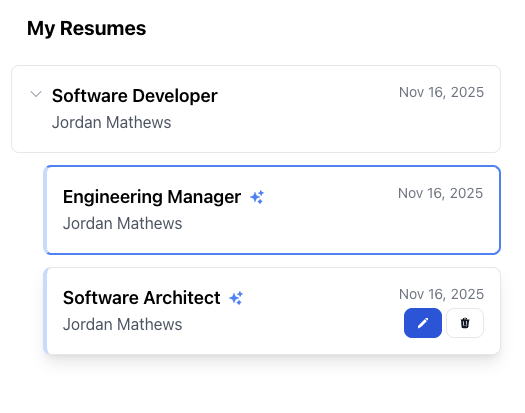 One JSON source powering multiple tailored resume versions for different job applications
The editor allows you to toggle sections on and off, reorder content, and apply different themes suited to each audience - all without duplicating your data. When you need to update your job history, you make the change once in your JSON file, and all your resume variants update automatically. You can export both versions to HTML and PDF formats with a single click, ensuring consistency across all your applications.
This workflow demonstrates the power of treating your resume like code: you maintain a single source of truth, create targeted variations effortlessly, and generate polished documents without the hassle of manual formatting.
Choosing the Right JSON Resume Editor
With the growing popularity of resume-as-code, several tools have emerged to help you create and manage JSON resumes. Here are the top options:
1. CoreCV.ai – CoreCV.ai stands out as a premier JSON resume editor, combining powerful features with an intuitive interface. It offers real-time editing with syntax highlighting and validation, ensuring your JSON is always correct. The platform provides AI-powered content suggestions to help you craft compelling resume descriptions. CoreCV.ai includes built-in ATS compatibility checking, 9 professional themes (3 free, 6 Pro), and one-click export to PDF and HTML formats. With its focus on both developer-friendly features and user experience, CoreCV.ai makes it easy to create, maintain, and tailor professional resumes from JSON data without the complexity of managing version control systems. For a detailed look at CoreCV's features, see our article on what is CoreCV.ai.
Note: While JSON resume editing offers powerful benefits, keep in mind that it still requires attention to data accuracy and format validation. The primary advantage is in the separation of data from presentation, enabling easier multi-format exports and role-specific tailoring.
2. JSON Resume Registry – This open‑source platform allows you to host your resume JSON in a GitHub Gist and view it with multiple themes. It provides version control through GitHub and instant sharing via URL. While it requires some familiarity with GitHub, it's a solid option for developers who want a free, open-source solution.
3. GitResume – GitResume embraces the resume‑as‑code philosophy with a CodeMirror‑powered editor. You can edit your resume in YAML or JSON with syntax highlighting and code completion. Changes are committed with version history, and you can create branches for different job applications. The platform offers one‑click export to PDF and shareable release links.
4. Command-line tools – For developers who prefer terminal workflows, various CLI tools can help you validate, transform, and export JSON resumes. These tools integrate well with automation scripts and CI/CD pipelines, though they typically require more setup and configuration.
5. Custom solutions – Some developers build their own tools using JSON resume data. This approach offers maximum flexibility but requires development time and maintenance. You can use libraries and frameworks to parse JSON, apply templates, and generate output formats.
When choosing a tool, consider your technical comfort level, need for automation, and whether you want AI assistance. For most developers, CoreCV.ai provides the best balance of power, ease of use, and professional output.
Conclusion: Empowering Developers in the Job Market
Treating your resume like code isn't just a novelty - it's a practical response to the realities of modern hiring. JSON provides a standardized, machine‑readable format that separates data from design. Modern JSON resume editors make it simple to edit in familiar formats, create multiple variations, apply themes, and share polished, ATS‑friendly documents.
By adopting a resume‑as‑code workflow, developers can spend less time fighting templates and more time showcasing their skills. The structured approach reduces errors, enables automation, and ensures your resume data remains portable and future-proof. Whether you're applying for your first job or making a career pivot, JSON resumes give you the flexibility and control that traditional formats simply can't match.
So why not give it a try? With tools like CoreCV.ai making JSON resume editing accessible and powerful, there's never been a better time to code your resume. Join the movement and see how far you can take your career when your CV is as flexible and powerful as your code.
Disclosure: This article is authored by the CoreCV team. While we mention CoreCV.ai, the strategies and advice presented apply to any JSON resume approach. We've included alternative tools and objective information where applicable.