Beating the Bots: How to Make Your Resume ATS-Friendly
In modern hiring, your resume often meets software before it reaches a recruiter. Applicant Tracking Systems (ATS) parse and rank resumes using algorithms that scan for keywords, structure, and formatting alignment. According to 2024 data, 98.4% of Fortune 500 companies use ATS systems, meaning 492 out of 500 of these large corporations rely on automated tools for recruitment. ATS can significantly reduce hiring cycles, but may also filter out qualified candidates whose resumes aren't optimally formatted for machine parsing.
The goal isn't to "trick" the system but to present your qualifications in a format both machines and humans can understand.
 Key statistics showing why ATS optimization is critical in today's job market
How ATS Systems Evaluate Resumes
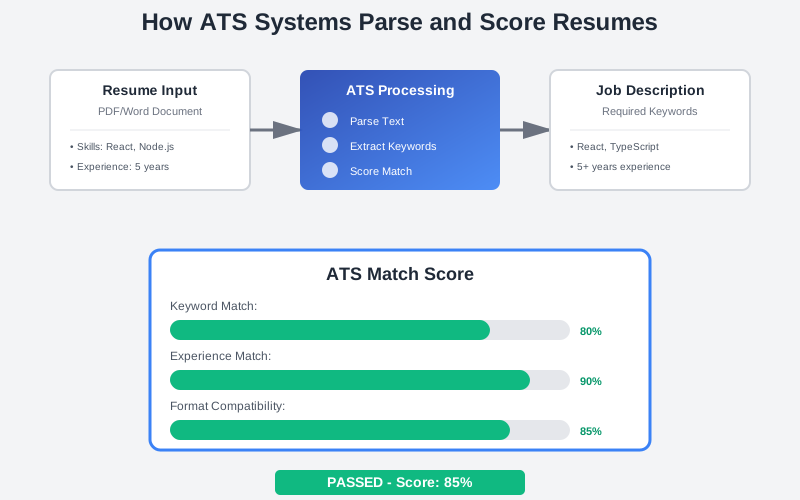
ATS platforms typically follow a three-step process: parsing, keyword scoring, and ranking.
First, the software extracts text from your resume and parses it into structured fields (name, contact info, work history, etc.). Modern ATS systems can read text-based PDFs and .docx files directly, but if your resume uses complex layouts, images, or unusual formatting, the parser may misread or omit critical data.
Next, the system scores your resume by comparing the extracted text against the job description. According to a 2025 Jobscan survey, 99.7% of recruiters use filters in their ATS or similar system to find the right candidate to interview. The software looks for exact matches to required skills, certifications, and job titles.
Finally, the ATS ranks candidates and surfaces those whose resumes closely align with the job requirements.
 The three stages of ATS evaluation and common parsing issues to avoid
Structuring Your Resume for ATS Success
Choose the Right File Format
Both PDF and .docx formats work with modern ATS platforms, but each has trade-offs. While modern ATS platforms generally handle both PDF and DOCX formats, compatibility can vary depending on the specific system used. PDFs preserve your visual formatting and look professional across all systems, while .docx files may offer slightly better compatibility with older ATS software.
Best practice: Use PDF when:
- You're applying through a modern job portal or company website
- The job posting doesn't specify a format
- You want to ensure your formatting stays intact (especially important for tools like CoreCV.ai that generate pixel-perfect PDFs)
Use .docx when:
- The job posting specifically requests it
- You're applying to a company known to use older systems
Critical: Regardless of format, ensure your PDF is text-based (not an image or scanned document) and uses standard fonts.
Note: ATS capabilities can vary significantly between different systems. When possible, research the specific ATS used by your target employer or follow any format guidelines they provide.
Use a Clean, Single-Column Layout
Simpler is better. ATS-friendly resumes use a single column with clearly labeled sections. Avoid complex multi-column layouts, nested tables, and text boxes that can confuse parsing algorithms. Jobscan's ATS guide reinforces this point, recommending a clean resume design with a clear hierarchy and avoiding overly complex designs or graphics. For a developer-friendly approach to maintaining structured resume data, explore building your resume as code with JSON.
 The ideal structure for an ATS-optimized resume with essential sections
Essential Sections
Organize your resume into standard sections that ATS can identify:
- Contact information: Place your name, phone number, email, and city/state in the main body rather than headers or footers, as some ATS systems may not reliably parse header/footer content.
- Professional summary or objective: Provide a concise, role-aligned snapshot of your expertise, focusing on relevant skills and outcomes.
- Work experience: Use reverse-chronological order; highlight accomplishments with metrics and results.
- Education: List degree, institution, and (optionally) graduation year.
- Skills and certifications: Present a targeted list of technical and business skills.
You can add optional sections (volunteer work, awards) only if they add professional value.
Stick to Professional Fonts and Bullet Points
Use standard fonts such as Arial, Calibri, Tahoma, or Times New Roman; unusual fonts may not scan correctly. Break up text with simple bullet points to improve readability. Avoid graphics, charts, or images.
Maintain Consistent Formatting
ATS algorithms rely on predictable patterns. Use a consistent date format (e.g., MM/YYYY) and place dates to the right of each entry. Keep bullet points concise (one to two lines) and avoid varying font sizes or spacing to cram in more content. Limit the resume to one or two pages and remove outdated roles or irrelevant information. For more ways to avoid formatting pitfalls, see our guide on common resume mistakes.
Keyword Alignment Strategies
Extract Keywords from Job Descriptions
The primary factor in ATS scoring is keyword matching. Start by reading the job posting carefully and noting repeated terms - these usually indicate critical skills. Focus on categories such as:
- Hard skills (e.g., programming languages)
- Software/tools (e.g., Docker, Kubernetes)
- Certifications (e.g., AWS Certified Solutions Architect)
- Job titles (e.g., Senior Software Engineer)
- Industry terminology (e.g., CI/CD, microservices)
For tech roles, specify the exact frameworks, languages, and platforms you've used; recruiters often skim for tech stack alignment.
 Strategic placement of keywords throughout your resume for maximum ATS impact
Use Exact Matches and Natural Language
Many ATS platforms rely on exact phrase matching. Use the exact wording from the job description whenever it accurately reflects your experience. For example, if the posting lists "Project Management," write "Project Management" instead of "Project Leadership."
Strategic Keyword Placement
Place high-priority keywords in multiple sections:
- Professional summary: Highlight core skills and your value proposition.
- Skills section: List your competencies in a comma-separated format, including both full terms and common abbreviations (e.g., "Search Engine Optimization (SEO)").
- Work experience bullet points: Integrate keywords into context by pairing them with action verbs and quantified results.
- Job titles: Align your previous titles with standard industry terminology where appropriate.
Important keywords should appear naturally throughout your resume in multiple sections. If a skill or technology is genuinely central to your experience, it will appear organically in your summary, skills section, and work experience. Focus on authentic integration rather than forced repetition.
Build a Master Keyword Database
For each job application, collect keywords from multiple job postings. Compile a list of the most common requirements, and ensure your resume addresses them. This approach helps you tailor your resume quickly for similar roles while staying authentic to your experience. To streamline this process, learn how to efficiently tailor your resume with AI.
Content Optimization for Tech Professionals
Write Action-Oriented Bullet Points
An effective bullet follows this formula: Action Verb + Specific Task/Responsibility + Quantifiable Result + Relevant Keywords.
For instance:
✅ "Implemented CI/CD pipelines with Jenkins and Docker, reducing deployment times by 40%"
This includes a clear action, a measurable result, and two keyword-rich tools.
Emphasize Technical Proficiency
Tech recruiters expect concrete evidence of your skills. Specify languages, frameworks, and cloud platforms you've used. List 10-20 targeted technical skills relevant to the role in your skills section, and ensure each appears in your work experience to substantiate your proficiency.
Incorporate a Professional Summary
Candidates with several years of experience should open with a 2–4 line summary that positions their technical focus and strengths. This section is prime real estate for keywords and can capture a recruiter's attention quickly.
Example:
"Backend engineer with 6+ years of experience building distributed systems in Go and Python. Proven track record of optimizing API performance and scaling infrastructure to support 10M+ daily users."
Align Job Titles and Seniority
If your job titles differ from industry norms, consider aligning them to standard terminology (e.g., "Software Engineer" instead of "Code Ninja") when it accurately reflects your role. Avoid creative titles that may confuse ATS algorithms.
Keep Contact Information Accessible
Ensure your name, phone number, email, and location are in the main body at the top of your resume. Include links to professional profiles such as LinkedIn or GitHub for technical roles.
Testing and Iterating Your Resume
Before submitting, test your resume's ATS compatibility by copying and pasting it into a plain text editor. If the text appears jumbled or out of order, the ATS will likely struggle to parse it.
Tools like Jobscan allow you to compare your resume against a job description and highlight missing keywords or formatting issues. Regularly iterating based on this feedback can boost your match rate and improve your chances of making it past the initial screen.
Pro Tip: Use CoreCV.ai to build ATS-friendly resumes with JSON structure. Our templates are optimized for parsing, and our AI-powered tailoring helps you match keywords naturally without stuffing.
Conclusion
Creating an ATS-friendly resume isn't about beating the system - it's about aligning your presentation with both machine and human readers.
Key takeaways:
- ✅ Use a clean, single-column layout and professional fonts
- ✅ Export as PDF with proper text encoding (not image-based)
- ✅ Avoid images, complex tables, and fancy graphics
- ✅ Organize your resume into predictable sections
- ✅ Ensure critical information is in the main body (not headers/footers)
- ✅ Extract keywords from job postings and incorporate them naturally
- ✅ Quantify your achievements and highlight technologies
- ✅ Test your resume with ATS scanning tools
By following these pragmatic guidelines, you'll increase the likelihood that your resume clears the ATS filter and reaches the eyes of a hiring manager. For a broader look at how structured data and AI are transforming resume creation, read about the future of tech resumes.
Ready to build an ATS-optimized resume? Try CoreCV.ai for structured, ATS-friendly resumes with AI-powered tailoring - so you can focus on showcasing your best work, not fighting with formatting.
Disclosure: This article is authored by the CoreCV team. While we mention CoreCV.ai, the strategies and advice presented apply to any ATS-friendly resume approach. We've included alternative tools and objective information where applicable.